Blog
Welcome


Recent posts
SEARCH RESULTS FOR: Printing

We've now released v1.49 to fix a few minor issues in 1.48, but everything in this post is still current - Ed. In case you haven't noticed, we kiwis are very modest ;) Which is why I like announcing stuff that I didn't have much to do with, but I feel really good about, because I can sing its praises without feeling bad about myself! Anyway… The dev team have been busy busy today pushing out a new final release, and I think it's a really good one. They've put a lot of time and effort into refining features first released in v1.47, especially for Queensberry Press Books, but there's some juicy To View More >>
This entry was posted in by Admin
Why not design your albums in Photoshop or InDesign? A lot of people do, and they're great applications – we depend on them both ourselves. A few thoughts … Adobe don't think designing your albums in Photoshop is a good idea. That's not what it's for. Adobe's page layout software is InDesign. So how much does InDesign know about wedding and portrait photographers, their workflow, their albums and their suppliers? InDesign doesn't know what DPI your lab needs, or what file type, or what size the printed layouts should be, or about bleed and trim requirements, or what colour management processes To View More >>
This entry was posted in by Admin

Meet one of Justine Ungaro's brand new client albums - a Mint green Queensberry Duo she shot and designed for clients Kristan and Steve. Justine met Steve while scouting for bands for her own wedding. He played in the band she eventually hired, and he booked her as his and Kristan's wedding photographer. Justine says, "We each had a real vested interest in the overall success of each other's weddings. It's been a pretty special relationship ever since." Kristan and Steve married on 30 May 2009 and when their album arrived, wrote to Justine to say... "We totally love this album! The photos look To View More >>
This entry was posted in by Admin
The purpose of our recent survey was to get a better picture of how you're using the software, and the features most important to you. It turns out you use Photojunction to design albums for almost a hundred album suppliers that we don't even offer resources for - no wonder a third of you "always" use Remix DIY! It's also clear that unless you're one of Queensberry's clients you're most likely using PJ primarily to design and export page layouts. That's not so surprising. Getting past "page design" requires a lot of input from vendors, and unfortunately they're much less engaged with PJ than their To View More >>
This entry was posted in by Admin
You probably know we offer free protective coating on all Queensberry prints bound in Queensberry albums. It's a fine, almost unnoticeable coating, that helps protect the images. Prints in Duo albums are a bit more exposed than in matted books, so we’ve decided to coat all prints bound into Duo albums from now on. Free of charge, obviously. As most of our clients already ask for their prints to be coated, this change will affect only a few clients. The change will be reflected automatically in Photojunction's smart filtering system in the next release, due out soon. If you'd like more information To View More >>
This entry was posted in by Admin
Wading through our "how-to" posts was quite a job. Trying to single out the best was just as difficult, but worth the effort. Here are my favourites. Hopefully you'll find them handy when dealing with Queensberry and Photojunction, and evaluating your own workflow... There's so much good stuff in the Smooth Sailing series I reckon you should check them all, but here are a few: Photo Front covers (easy peasy) - If designing Photo Front covers sounds hard. It's not. Here's how to easily do it. What can delay your orders? - Here are a few simple things that frequently delay people's orders (long To View More >>
This entry was posted in by Admin

Photography by David Jay Seth Godin said recently , 'If you want to build a brand for the ages, you need to stand for something today, and tomorrow, and every day.' Among other things, we stand for quality, which is why the prints on our digital pages are split at the centreline, leaving a gap of about 2mm (about 1/16”). Some people might not like the look, but we can't compromise products designed to last for generations. Actually, there are two reasons for this: more flexibility as to what equipment you can print on, and because the fold in the print almost invariably discolours and/or cracks. To View More >>
This entry was posted in by Admin
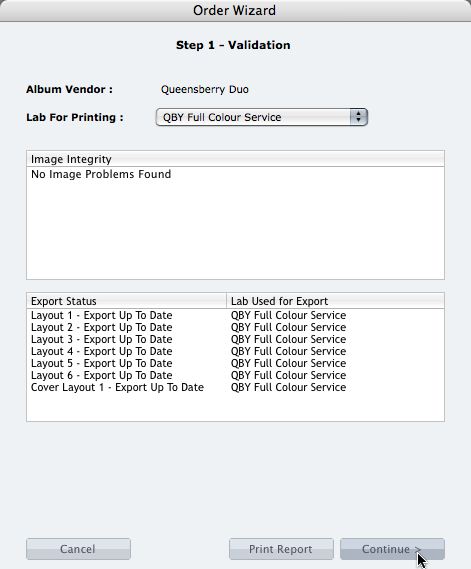
We're describing the perfect way to send us your print-and-bind order... After exporting your files you definitely shouldn't jump straight to LabFTP and send us the files - we wouldn't know what to do with them! Instead, always use the Remix Order Wizard. (You'll find it under the Album menu). Remix will validate your order and create an order "bundle" that contains everything we'll need to process your order - provided you follow these instructions: 1. Run your order through the Send Order Wizard. You'll find a tutorial here. The Wizard will ask what service you want (eg Print & Assemble) To View More >>
This entry was posted in by Admin
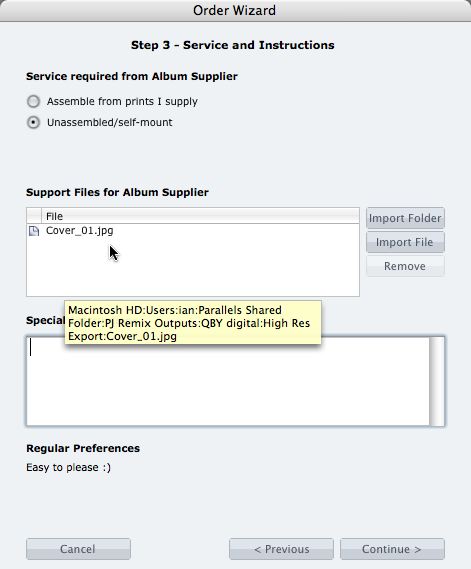
What if you want us to print your cover image, but nothing else? 1. When you fire up the Remix Order Wizard , choose either the "Assemble From Prints Supplied" or Don't Assemble" option. 2. On the same screen the Wizard will offer a place to include "support files" for your album supplier. Open your folder of High-Res Export files and drag in a copy of the cover image (don't double up by sending it to your lab to print as well). 3. Remix may ask you if you want us to print the cover image (generally it'll be obvious what you want, in which case Remix won't ask). Be sure to say Yes. 4. When the To View More >>
This entry was posted in by Admin

Cover layout design in PJ Remix Here are the first steps in preparing a perfect, hassle-free print-and-bind order, really fast. 1. First, upgrade to PJ Remix. If you have already, thank you. 2. Use Remix to design your cover as well as your page layouts. You'll get to frame and crop the cover image yourself, see exactly what it looks like and be sure that it looks good. For example, here you can see how much of the image in the photo front cover layout above has been cropped away. No problem in this case, but many images won't be suitable: 3. Export your cover AND page layouts using Remix's Export To View More >>
This entry was posted in by Admin