Blog
Welcome


Recent posts
SEARCH RESULTS FOR: Lab
You probably know we offer free protective coating on all Queensberry prints bound in Queensberry albums. It's a fine, almost unnoticeable coating, that helps protect the images. Prints in Duo albums are a bit more exposed than in matted books, so we’ve decided to coat all prints bound into Duo albums from now on. Free of charge, obviously. As most of our clients already ask for their prints to be coated, this change will affect only a few clients. The change will be reflected automatically in Photojunction's smart filtering system in the next release, due out soon. If you'd like more information To View More >>
This entry was posted in by Admin
Wading through our "how-to" posts was quite a job. Trying to single out the best was just as difficult, but worth the effort. Here are my favourites. Hopefully you'll find them handy when dealing with Queensberry and Photojunction, and evaluating your own workflow... There's so much good stuff in the Smooth Sailing series I reckon you should check them all, but here are a few: Photo Front covers (easy peasy) - If designing Photo Front covers sounds hard. It's not. Here's how to easily do it. What can delay your orders? - Here are a few simple things that frequently delay people's orders (long To View More >>
This entry was posted in by Admin
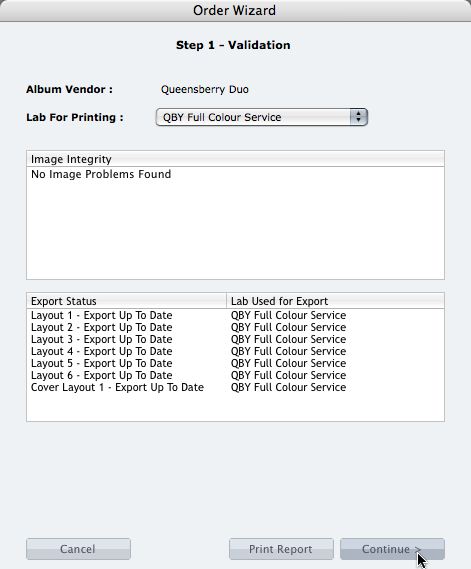
We're describing the perfect way to send us your print-and-bind order... After exporting your files you definitely shouldn't jump straight to LabFTP and send us the files - we wouldn't know what to do with them! Instead, always use the Remix Order Wizard. (You'll find it under the Album menu). Remix will validate your order and create an order "bundle" that contains everything we'll need to process your order - provided you follow these instructions: 1. Run your order through the Send Order Wizard. You'll find a tutorial here. The Wizard will ask what service you want (eg Print & Assemble) To View More >>
This entry was posted in by Admin
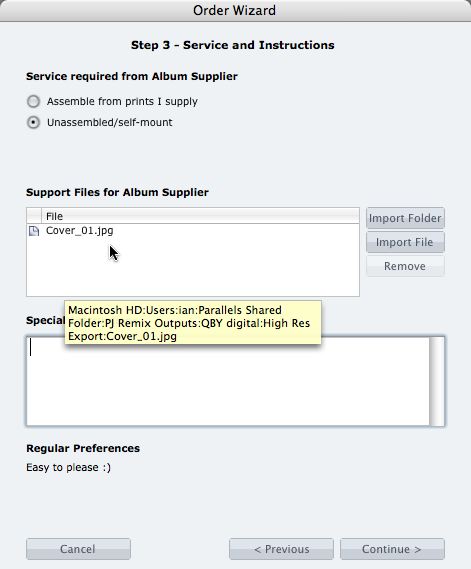
What if you want us to print your cover image, but nothing else? 1. When you fire up the Remix Order Wizard , choose either the "Assemble From Prints Supplied" or Don't Assemble" option. 2. On the same screen the Wizard will offer a place to include "support files" for your album supplier. Open your folder of High-Res Export files and drag in a copy of the cover image (don't double up by sending it to your lab to print as well). 3. Remix may ask you if you want us to print the cover image (generally it'll be obvious what you want, in which case Remix won't ask). Be sure to say Yes. 4. When the To View More >>
This entry was posted in by Admin

Cover layout design in PJ Remix Here are the first steps in preparing a perfect, hassle-free print-and-bind order, really fast. 1. First, upgrade to PJ Remix. If you have already, thank you. 2. Use Remix to design your cover as well as your page layouts. You'll get to frame and crop the cover image yourself, see exactly what it looks like and be sure that it looks good. For example, here you can see how much of the image in the photo front cover layout above has been cropped away. No problem in this case, but many images won't be suitable: 3. Export your cover AND page layouts using Remix's Export To View More >>
This entry was posted in by Admin

When your first ever album order catches Queensberry’s eye you’ve got to be pretty pleased with yourself. Especially when you designed it in a program you’ve never used before. Keryn Sweeney of Keryn Maree Photographer recently opened her studio in Auckland, New Zealand, and shot and designed this little gem as a studio sample for the beauty side of her business - an area she’s had plenty of experience in. Keryn recognises the benefits of offering her clients albums, but although she'd come from a well-established beauty and glamour studio she'd never used them before. When it came to choosing To View More >>
This entry was posted in Uncategorized by Admin

The New Year is a great time to stop, take a look around, absorb what you've achieved, and focus on what the year ahead offers. I've just done the absorb bit. Gone back and had a look at what we've posted over the past year. I found some really great stuff I'd forgotten about! No doubt you've forgotten or missed some of these posts too so over the next few days we'll bring you our favourite posts of 2008. There's not much of a criteria - just posts that really stood out to us. I hope they do to you too. We'll start by engaging your senses. Today we've picked a couple of really interesting interviews, To View More >>
This entry was posted in by Admin

Well, today is our last day, and it's time to express once again our thanks for your support in 2010. We're hugely grateful, not just for the business you send us, but for the friendship and generosity that makes our job such a pleasure. Yesterday was the Summer solstice for us – the longest day, with the promise of long sunny days to come – but for many of you it was the shortest, and in many cases the weather has been pretty bad. Whatever the weather's like outside we hope it's warm and welcoming at your place. Our holiday wish for you is that – like Adrienne's dogs – you take into 2011 To View More >>
This entry was posted in by Admin

Just in case you need us during the holiday period, we have staff working through the break to ensure Photojunction support is available. We are however going to take a couple of annual public holidays off (NZDT): - 25 December (Christmas day) - 26 December (Boxing day) - 1 January (New Years day) - 2 January Here's a recap of our support hours.... New Zealand: 8am – 4.30pm (Mon-Fri) and 1am – 7am (Tues-Sat) Australia: 6am – 2.30pm (Mon-Fri) and 11pm – 5am (Tues-Sat) UK: 2pm – 8pm and 9pm (Mon-Fri) - 5.30am (Sun-Thurs) US (East Coast): 9am – 3pm (Mon-Fri) and 4pm – 12.30am (Sun-Thurs) To View More >>
This entry was posted in by Admin
The end is nigh for our Classroom Movie series as we finish off the syllabus this week with a 'presenting to clients' webinar. This is powerful functionality that gets overlooked in our introductory webinars... Here's what we'll be covering tomorrow: - Full screen review mode - The Collection builder - Proof sheets and proof layouts - Reports - Slideshows/Quicktime - Online proofing Click here to register and for more information. If you’ve missed our previous webinars, check out our up-to-date Classroom Movies here. As always, hope to see you there! Nigel To View More >>
This entry was posted in by Admin