Blog
Welcome


Recent posts
SEARCH RESULTS FOR: Presentation

I was listening to a lovely song by Amy Seeley and was imagining images in my head. The song is haunting and has a feeling of being connected to a story. When I think about stories I usually think in a visual way. Creating a relationship between sound and imagery that isn't literal is a powerful thing. That is the difference between an album of images from a wedding, and the emotional and visual journey that is an album as a story, a collection of memories, a journey, a love, and a destination. One is a set of pictures, and the other is a visual and emotional soundscape - a song in my head. What To View More >>
This entry was posted in by Admin

Shortly after the iPad was announced, Nigel posted about wanting to run Photojunction on it. While that hasn't happened (yet), the iPad has become quite a popular tool for photographers. Personally, I like to use it to present final album designs to clients. Photojunction makes creating and editing layouts so simple, that sitting there with a client flicking through their spreads takes the mystery out of knowing exactly what they'll end up with. There are so many presentation options within Photojunction, but here's a few that work with the iPad... 1. Slideshows Want an album slideshow to fit perfectly To View More >>
This entry was posted in by Admin

Jerry Tomko is a long time friend who comes to mind whenever we think of heavy Photojunction users. He designs and sells a huge number of albums each year and has been using the software for as long as we can remember. 1) What impact does Photojunction have on your album design workflow? Photojunction has had a huge impact on my album design workflow. I have always been a firm believer in predesign - and in wedding albums, and I truly believe you should be able to see what you are purchasing. Even back in the film days, I would always present to the client what the album would look like before To View More >>
This entry was posted in Uncategorized by Admin
This week's webinar is our 'Intro to Photojunction' presentation taking place right here (online) on Thursday 27 May @ 9am (NZT). In this webinar Danny will show you how to fire up the software and start using it. He’ll also walk you through everything from registering, to designing an album, to exporting and sending. As always, it’s free to attend and everyone’s welcome. Click here to register See you there! Cheers, Nigel PS Thursday 27 May @ 9am NZT time means: AUSTRALIA – Thursday 27 May 7:00 AM NEW ZEALAND – Thursday 27 May 9:00 AM UK – Wednesday 26 May 10:00 PM USA (West Coast) To View More >>
This entry was posted in by Admin

It's that time of year when we take stock, make resolutions and ask questions ... like how can we make this year a winner? Are there too many photographers? Why do we ask our competitors for advice? What can we learn from musicians? And the big one: How much are our images worth? Sadly, that's not just about how good they are or how much time we spend on them in post-production. Our latest client newsletter is below. Let us know what you think by leaving a comment here or emailing Ian directly. Cheers, Nigel How much are your images worth? We received this present from our design consultants, Alt To View More >>
This entry was posted in by Admin

Check out the Reports feature in Photojunction. They're good for the business end of the album process, like signing off designs and handling edits. Album Menu > Generate Reports Photojunction creates reports as PDFs so they're ideal for sending to clients. Here's an example of a page from a Album Report (Small images) - click to enlarge: There's several other report options to choose from, so have a play and see which best suits your needs. Next in this series Cheers, Danny To View More >>
This entry was posted in by Admin

All the options in Slide show can be set as defaults in preferences. Big time saver. Next in this series Cheers, Danny To View More >>
This entry was posted in by Admin
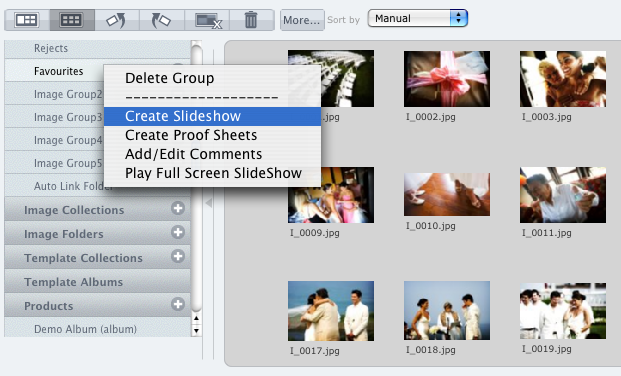
Photojunction's Slideshow creator might not be the most full featured app out there, but it's certainly one of the quickest and it outputs the smallest file size around. Same deal as Proof Sheets. Right click on the Group or Collection you want to create the slideshow from, and select 'Create Slideshow'. Or take the long way round... Create a new product and select Slideshow from the Project Setup window. Otherwise, you can also right-click on any layout in the Preview window and select 'Create Slideshow'. Here's a couple of previous posts about Remix's slideshow feature... Remix's Slideshow feature To View More >>
This entry was posted in by Admin

Proof sheets is a feature we’ve revived from PJ Retro, only it's now way better... And quicker. Here's the quickest way to create Proof Sheets (it only takes two clicks!): Right click on the Image Group or Collection you want to create Proof Sheets for, and hit 'Create Proof Sheets'. Alternatively you could take the back streets and create Proof Sheets as a new product in the event window: Hit the plus button (+) next to Products on the accordion menu... And then select Proof Sheets from the options in the Project Setup window. Or... Add them as a new product via the browser menu and select the To View More >>
This entry was posted in by Admin

Our Collection Builder reduces image sorting (and selling) to a few quick and easy steps. Here's a previous post that tells you all about it: Sorting is so easy Just in case you were wondering, it uses the Smart Full Screen feature too ;) Next in this series Cheers, Danny To View More >>
This entry was posted in by Admin