Blog
Welcome


Recent posts
SEARCH RESULTS FOR: Photoshop
When a bride comes to you and says, "Can you make me look slimmer on my wedding day?" we say "Yes". We say "Yes… but we need to work on this together." Often the dream comes with an expectation. Anything that is not ideal will somehow miraculously correct itself on the day ... or at least we, as the recorders of the day, will create the truth that they, the happy couple, hoped for. So when the bride says, "I want to look thinner on my wedding day" we tell them they need to help us out. (Sometimes this is the not so subtle difference between our roles as dream keepers and miracle workers – Photoshop To View More >>
This entry was posted in by Admin
I've gathered enough gongs now to qualify for an opinion on album design. Last week I was a judge for the Australian Professional Photography Awards at PMA in Melbourne. This was an honour I shared with the lovely Jo Grams, Jerry Ghionis, Jackie Chan, Yervant and other luminaries. Several things became apparent: 1) Some authors treated the album as a set of individual prints, mixing black and whites with colours, verticals with horizontals, with blatant disregard for the influence of those images on each other. 2) Some authors were hypnotised by the ability to apply a filter to create a look ... To View More >>
This entry was posted in by Admin

Jerry Tomko is a long time friend who comes to mind whenever we think of heavy Photojunction users. He designs and sells a huge number of albums each year and has been using the software for as long as we can remember. 1) What impact does Photojunction have on your album design workflow? Photojunction has had a huge impact on my album design workflow. I have always been a firm believer in predesign - and in wedding albums, and I truly believe you should be able to see what you are purchasing. Even back in the film days, I would always present to the client what the album would look like before To View More >>
This entry was posted in Uncategorized by Admin
Here's a quick, real-life story about Photojunction's auto-save templates feature. Last week we got a slightly panicked call from a PJ user who'd lost her entire album design. Frustrating. Support treats calls like this as detective stories, and they're really good at solving them. But what happened is less important than what to do about it. She thought she'd need to totally re-design her album, but we introduced her to Photojunction's auto-save templates feature. During the design of every album you do, Photojunction auto-saves templates of your design. It's not an option you can turn on and To View More >>
This entry was posted in by Admin

It's that time of year when we take stock, make resolutions and ask questions ... like how can we make this year a winner? Are there too many photographers? Why do we ask our competitors for advice? What can we learn from musicians? And the big one: How much are our images worth? Sadly, that's not just about how good they are or how much time we spend on them in post-production. Our latest client newsletter is below. Let us know what you think by leaving a comment here or emailing Ian directly. Cheers, Nigel How much are your images worth? We received this present from our design consultants, Alt To View More >>
This entry was posted in by Admin

We don't know many people who know their way around Photojunction better than Chip Gillespie. Especially when it comes to shortcuts. We call him a Power User. (He's also the founder of Blogstomp, which is well worth checking out.) 1) You're a PJ power user – how long have you been using Photojunction and what attracted you to it in the first place? I have been using PhotoJunction for a little over a year. To be truthful, I was skeptical at first as I had what I believed to be a near-perfect album design process using Photoshop. On the recommendation of a friend and fellow photographer/designer, To View More >>
This entry was posted in Uncategorized by Admin
I was thinking about this the other day as I was driving back from a wedding out of town. We need to try to find ways for our brides and grooms to commit to being photographed. I have seen both extremes, one where the bride is expecting you to pull rabbits from hats because she paid you a lot of money to do your magic, and the other extreme where she almost dresses as a rabbit to make your life easier, and the magic more real. One bride came to me telling me I had the job (of shooting her wedding) if I could make her look skinnier in the photographs ... I said to her we could but I needed her help. To View More >>
This entry was posted in by Admin

We have discovered a new range of Photoshop plugins that allows us to put the soul (which we forgot to put in while shooting) back into our imagery. Because these soulful images are our unique selling point, I can't tell you where we found them. With this set of plugins we are able to take a loveless bride and groom and turn them into passionate beings. We are able to take an indiscreet glance and turn it into the look of love. We are able to take monochromatic feelings and turn them into a fiercely burning fire ... all with the help of some photoshop and a couple of plugins. It's not true! That's To View More >>
This entry was posted in by Admin

This video by Zack Arias for Scott Kelby's Photoshop Insider touched a chord for me. If you haven't seen it it is worth the five minutes to do the journey. Zack Arias is one of the speakers at Photoshop World in March 2010. Cheers, Johannes PS Trust him, this is good ... but it's more than 5 minutes - Ian To View More >>
This entry was posted in by Admin
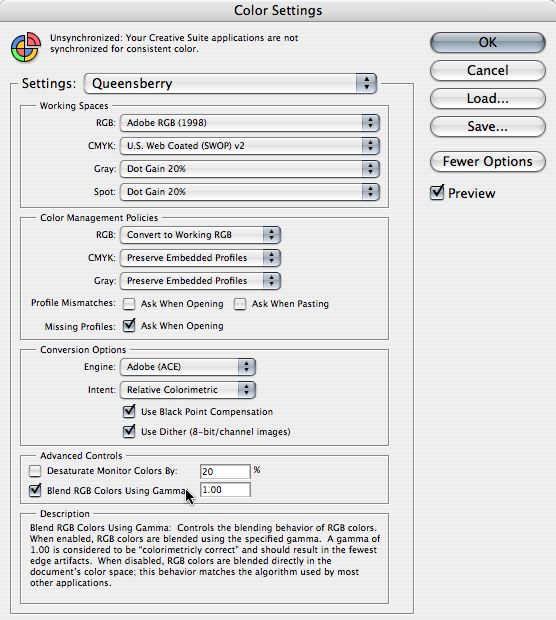
This is an important message if you send us layered PSD files. If any of the layers have reduced opacity what you see on screen may NOT match the print - unless you check an obscure preference box in Photoshop’s Colour Settings. In this post we'll tell you what to do about it, and why. In Color Settings’ Advanced Controls you should CHECK the box, “Blend RGB Colors Using Gamma” (as in the graphic). Leave the value set to 1.00. This is considered ‘colorimetrically correct’ by Adobe and will match our settings in the Lab. This check box affects the way that RGB colours are blended and To View More >>
This entry was posted in by Admin