Blog
Welcome


Recent posts
SEARCH RESULTS FOR: Workflow
Why not design your albums in Photoshop or InDesign? A lot of people do, and they're great applications – we depend on them both ourselves. A few thoughts … Adobe don't think designing your albums in Photoshop is a good idea. That's not what it's for. Adobe's page layout software is InDesign. So how much does InDesign know about wedding and portrait photographers, their workflow, their albums and their suppliers? InDesign doesn't know what DPI your lab needs, or what file type, or what size the printed layouts should be, or about bleed and trim requirements, or what colour management processes To View More >>
This entry was posted in by Admin
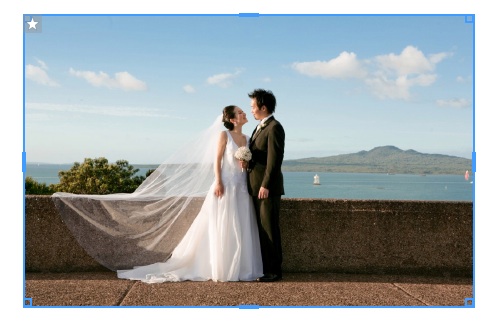
Version 1.47, builds on changes introduced in v1.46. Our main focus was on Queensberry's new press books, including fixes to the new workflow, many of them "behind the scenes" from the user point of view. We know we have a way to go with this and the developers are continuing to work on cover design issues in particular. Having said that we've introduced three new features to speed up your album design. They're still a bit "v1.0", but we wrote them in consultation with Queensberry's design team, who live and die by productivity, and we wanted to get them to you early so you could take a look and To View More >>
This entry was posted in by Admin
Wading through our "how-to" posts was quite a job. Trying to single out the best was just as difficult, but worth the effort. Here are my favourites. Hopefully you'll find them handy when dealing with Queensberry and Photojunction, and evaluating your own workflow... There's so much good stuff in the Smooth Sailing series I reckon you should check them all, but here are a few: Photo Front covers (easy peasy) - If designing Photo Front covers sounds hard. It's not. Here's how to easily do it. What can delay your orders? - Here are a few simple things that frequently delay people's orders (long To View More >>
This entry was posted in by Admin
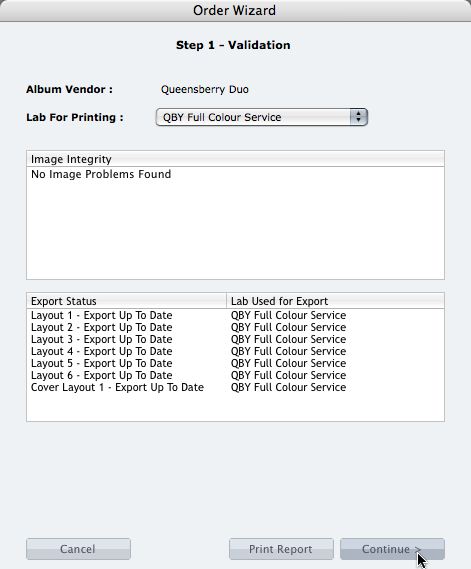
We're describing the perfect way to send us your print-and-bind order... After exporting your files you definitely shouldn't jump straight to LabFTP and send us the files - we wouldn't know what to do with them! Instead, always use the Remix Order Wizard. (You'll find it under the Album menu). Remix will validate your order and create an order "bundle" that contains everything we'll need to process your order - provided you follow these instructions: 1. Run your order through the Send Order Wizard. You'll find a tutorial here. The Wizard will ask what service you want (eg Print & Assemble) To View More >>
This entry was posted in by Admin
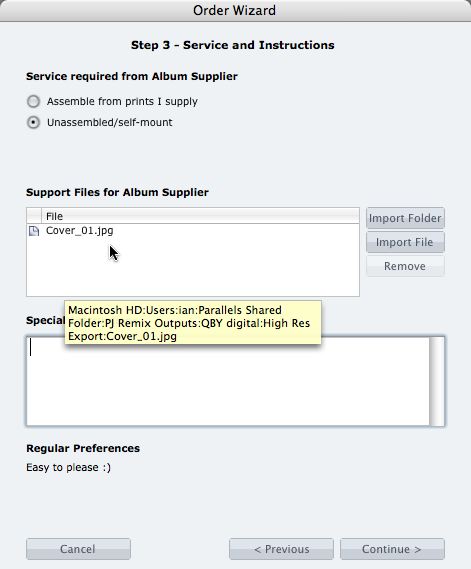
What if you want us to print your cover image, but nothing else? 1. When you fire up the Remix Order Wizard , choose either the "Assemble From Prints Supplied" or Don't Assemble" option. 2. On the same screen the Wizard will offer a place to include "support files" for your album supplier. Open your folder of High-Res Export files and drag in a copy of the cover image (don't double up by sending it to your lab to print as well). 3. Remix may ask you if you want us to print the cover image (generally it'll be obvious what you want, in which case Remix won't ask). Be sure to say Yes. 4. When the To View More >>
This entry was posted in by Admin

Cover layout design in PJ Remix Here are the first steps in preparing a perfect, hassle-free print-and-bind order, really fast. 1. First, upgrade to PJ Remix. If you have already, thank you. 2. Use Remix to design your cover as well as your page layouts. You'll get to frame and crop the cover image yourself, see exactly what it looks like and be sure that it looks good. For example, here you can see how much of the image in the photo front cover layout above has been cropped away. No problem in this case, but many images won't be suitable: 3. Export your cover AND page layouts using Remix's Export To View More >>
This entry was posted in by Admin
Each version of Photojunction takes us further towards a seamless workflow to design, export and upload your album orders to Queensberry – right first time and hassle-free.. If you're using Queensberry this is just a reminder that you no longer need to use LabFTP. Photojunction does it all, and the advantage is that the processes are managed and automated – so there’s minimal opportunity for anything to go wrong, and you’ll get your album faster. Cheers, Ian To View More >>
This entry was posted in by Admin

Jerry Tomko is a long time friend who comes to mind whenever we think of heavy Photojunction users. He designs and sells a huge number of albums each year and has been using the software for as long as we can remember. 1) What impact does Photojunction have on your album design workflow? Photojunction has had a huge impact on my album design workflow. I have always been a firm believer in predesign - and in wedding albums, and I truly believe you should be able to see what you are purchasing. Even back in the film days, I would always present to the client what the album would look like before To View More >>
This entry was posted in Uncategorized by Admin

We met Jeff Youngren and his wife Erin (The Youngrens) a couple of years ago at WPPI and they've been on board with PJ ever since. Danny's received numbers of calls from Jeff about ideas for new Photojunction features, and it was one of those that is partly to thank for the new integration of albumexposure with Photojunction. 1) How do you like the albumexposure online album proofing feature? Why should others try it out? "To me, the Albumexposure/PJ integration is a game changer in the industry - never before has something so common been integrated so well into the whole design process. I'm blown To View More >>
This entry was posted in by Admin
The best album design software is now free to all. The Directors of Queensberry and Photojunction are delighted to announce a major change of direction for Photojunction. Effective immediately PJ Remix is a free download for photographers everywhere. This is great news for Queensberry clients in particular as it means developing a dedicated, intuitive, hassle-free Queensberry workflow will be a top priority. You can read the full announcement on The Junction. Best wishes from the Queensberry Client Support Team To View More >>
This entry was posted in by Admin