Blog
Welcome


Recent posts
SEARCH RESULTS FOR: Tip

After talking to Jessica Mills from NZ Colour Management, I thought we should bring in someone from the front lines! Philip Laing is one of our lab support specialists, and if my conversation with him paints a picture of a bunch of people obsessed with quality and delivering you the best possible album, my work is done. If you get get an insight into the many ways in which our lab service is truly unique in the album business, even better! Philip is what we call a "support detective". With a stack of experience – and huge enthusiasm for photography – he's in the front line every day ensuring To View More >>
This entry was posted in by Admin

I just made a couple of new friends, Jeff and Erin Youngren from San Diego… And it took all of a couple of minutes. Stephen and Danny first met these guys at WPPI in Vegas, and we’ve been in touch ever since. You may remember our post about their new website and promo video so I asked them to share some of their experiences around online marketing, business and their album strategy. But it was their philosophy, not only to business, but to life, that dominated the conversation. Let’s be friends Jeff and Erin had just returned from a holiday to Walt Disney World in Orlando, Florida, with To View More >>
This entry was posted in by Admin
Having worked on the Photojunction help desk for the last six weeks I have had a very good chance to look more closely at this great piece of software. I have seen the problems people have with it. The problems fall into three categories ... The software, the user, the computer. The software is good. Actually it is really good. It's not perfect, but with every iteration it gets better, and if it was ever perfect the developers would be out of a job. It has weaknesses but they are outweighed by its strengths. It could never be perfect because it is constantly evolving to meet the needs of a changing To View More >>
This entry was posted in by Admin
Further to Anna's emotional cry to 'save people in photographs from random and thoughtless amputations'… I was trying to think of a way to 'stop the suffering'. It occurred to me that we could specifically shoot for the panoramic opportunity. Shoot what you might call 'the subject image' and then move slightly to get the 'rest of the scene' photograph. Use the spine as the aligned join for these images to create a panoramic effect. This has two advantages. The enlargement required is less, keeping the quality up. You plan more for the placement of your subject so that nobody has to lose an arm. To View More >>
This entry was posted in by Admin
Three quick tips to simplify album design. 1. Avoid unnecessary repetition (eg this is the bride looking slightly left, straight ahead, and slightly right) unless you make your profits from the number of images you sell. 2. Embrace open space (especially in sample albums - lead by example). 3. Offer a two album option that allows people to have lots of images without overcrowding. While I'm mentioning 'leading by example': If you don't make a sample album from each order, at least make each design into a slideshow you can show prospective clients. This library of slideshows allows you to show them To View More >>
This entry was posted in by Admin
Wading through our "how-to" posts was quite a job. Trying to single out the best was just as difficult, but worth the effort. Here are my favourites. Hopefully you'll find them handy when dealing with Queensberry and Photojunction, and evaluating your own workflow... There's so much good stuff in the Smooth Sailing series I reckon you should check them all, but here are a few: Photo Front covers (easy peasy) - If designing Photo Front covers sounds hard. It's not. Here's how to easily do it. What can delay your orders? - Here are a few simple things that frequently delay people's orders (long To View More >>
This entry was posted in by Admin

We know the feeling – you know there must be a way to do something, but you just can't figure it out. Here's an example: there's no standard "title" aperture in PJ Remix, so how do you add a title? There are actually two ways to do it. The easier way (but maybe also easier to get wrong) is simply this: Add a blank aperture to the layout using the Add button (left image, above) Change the aperture to Customise (right image, above) Uncheck the Constrain Proportions box and enter the values directly. Easy as long as you remember the values: 112 wide by 200 high , as above. Whether you use To View More >>
This entry was posted in by Admin
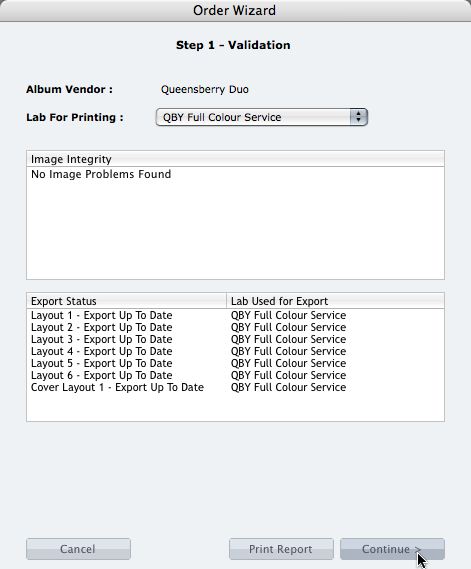
We're describing the perfect way to send us your print-and-bind order... After exporting your files you definitely shouldn't jump straight to LabFTP and send us the files - we wouldn't know what to do with them! Instead, always use the Remix Order Wizard. (You'll find it under the Album menu). Remix will validate your order and create an order "bundle" that contains everything we'll need to process your order - provided you follow these instructions: 1. Run your order through the Send Order Wizard. You'll find a tutorial here. The Wizard will ask what service you want (eg Print & Assemble) To View More >>
This entry was posted in by Admin
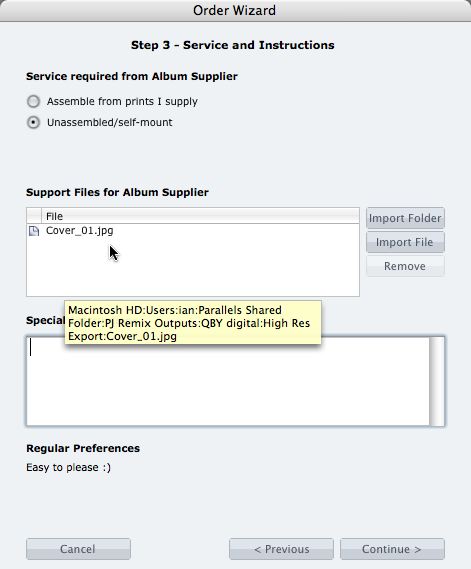
What if you want us to print your cover image, but nothing else? 1. When you fire up the Remix Order Wizard , choose either the "Assemble From Prints Supplied" or Don't Assemble" option. 2. On the same screen the Wizard will offer a place to include "support files" for your album supplier. Open your folder of High-Res Export files and drag in a copy of the cover image (don't double up by sending it to your lab to print as well). 3. Remix may ask you if you want us to print the cover image (generally it'll be obvious what you want, in which case Remix won't ask). Be sure to say Yes. 4. When the To View More >>
This entry was posted in by Admin

Cover layout design in PJ Remix Here are the first steps in preparing a perfect, hassle-free print-and-bind order, really fast. 1. First, upgrade to PJ Remix. If you have already, thank you. 2. Use Remix to design your cover as well as your page layouts. You'll get to frame and crop the cover image yourself, see exactly what it looks like and be sure that it looks good. For example, here you can see how much of the image in the photo front cover layout above has been cropped away. No problem in this case, but many images won't be suitable: 3. Export your cover AND page layouts using Remix's Export To View More >>
This entry was posted in by Admin